
2026-04-15 · 7 min read
Some watermarks are not missing-pixel problems. They are mixed-signal problems.
If an opaque object covers an image, the hidden content is unknown and inpainting has to synthesize a plausible patch. A fixed semi-transparent watermark is different: it is blended with the original pixels. When the logo color, alpha mask, and placement can be estimated, the watermark can often be inverted instead of guessed.
That is why the first practical rule is simple: deterministic restoration works best on original exports with fixed transparent overlays. Screenshots, resized images, chat-app forwards, and recompressed copies make the blend harder to reverse.
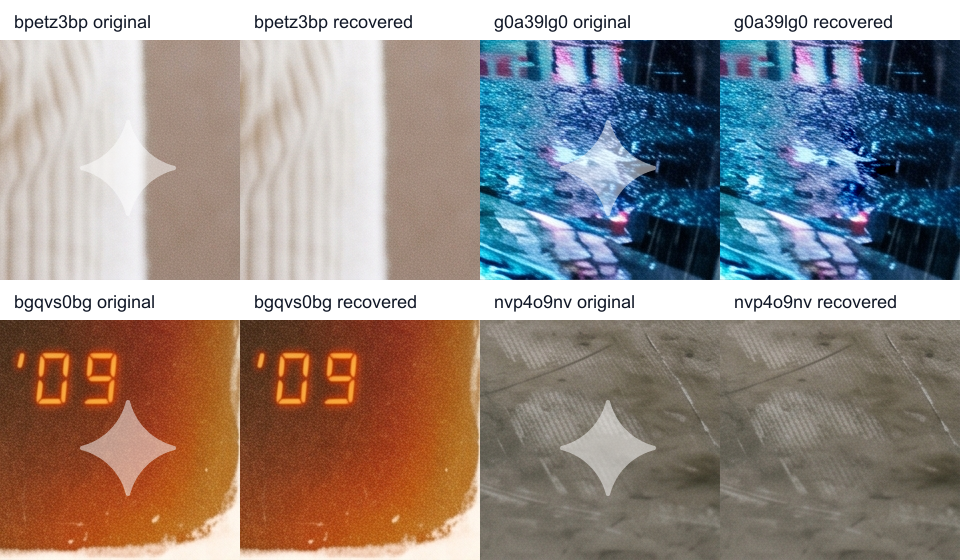
Gemini image watermarks are a useful case study because they are visible, structured, and repeatable. A practical Gemini logo remover can treat that lower-right mark as a deterministic overlay rather than a mystery object. The broader lesson applies to transparent watermarks in general: if the watermark was mixed into the image by a known blend, a mathematical recovery path can preserve texture that inpainting would have to invent.
The crop shows the local effect clearly. The full frame matters for a different reason: it confirms the operation is limited to the watermark region and does not repaint the rest of the image.

The Core Equation
Most visible transparent watermarks are composited with linear-light alpha blending:
$$ C_{\mathrm{result}} = \alpha C_{\mathrm{logo}} + (1 - \alpha) C_{\mathrm{original}} $$
If the logo color and alpha are known, the original pixel can be recovered in that same space:
$$ C_{\mathrm{original}} = \frac{C_{\mathrm{result}} - \alpha C_{\mathrm{logo}}}{1 - \alpha} $$
For a white watermark, `C_logo` is usually close to `255` in each RGB channel. With the correct alpha map and location, the operation is fast, deterministic, and local. It does not need a diffusion model, a LaMa-style inpainting network, or a content-aware fill pass.
The important distinction is the source of the replacement pixels. Inpainting predicts content from surrounding context. Inverse alpha restoration recovers content from the watermarked pixels themselves.
Why the Result Is Not Always Perfect
The equation is simple, but the inputs must be accurate. A practical remover has to estimate several things at the same time:
- The watermark position.
- The alpha map shape.
- The alpha strength.
- The logo color.
- The color space in which blending happened.
- Whether one inverse pass is enough.
- Whether the image stayed untouched after export.
If those values are wrong, the output can show a faint white mark, a dark inverse ghost, or a colored outline. These artifacts are usually parameter errors, not proof that the background is too complex.