
Some watermarks are not missing-pixel problems. They are mixed-signal problems.
If an opaque object covers an image, the hidden content is unknown and inpainting has to synthesize a plausible patch. A fixed semi-transparent watermark is different: it is blended with the original pixels. When the logo color, alpha mask, and placement can be estimated, the watermark can often be inverted instead of guessed.
That is why the first practical rule is simple: deterministic restoration works best on original exports with fixed transparent overlays. Screenshots, resized images, chat-app forwards, and recompressed copies make the blend harder to reverse.
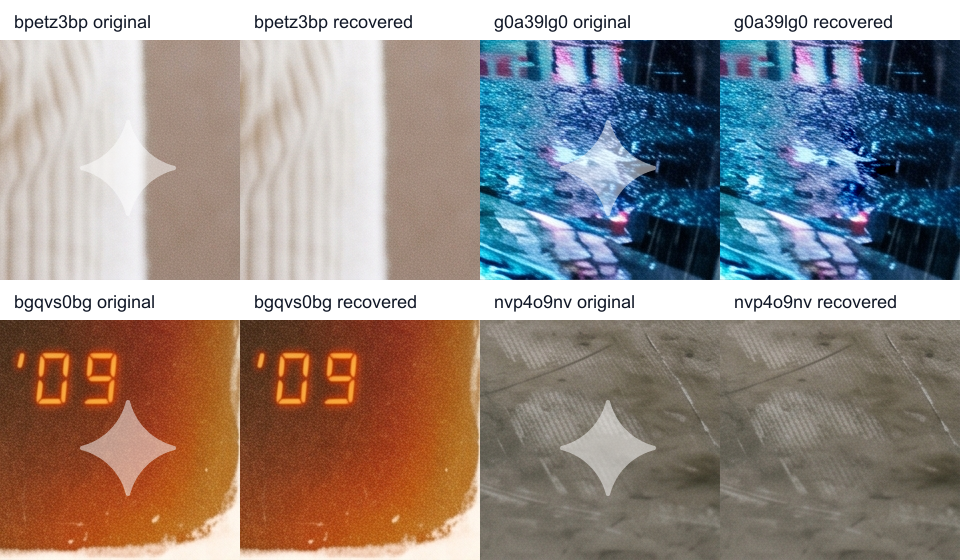
Gemini image watermarks are a useful case study because they are visible, structured, and repeatable. A practical Gemini logo remover can treat that lower-right mark as a deterministic overlay rather than a mystery object. The broader lesson applies to transparent watermarks in general: if the watermark was mixed into the image by a known blend, a mathematical recovery path can preserve texture that inpainting would have to invent.
The crop shows the local effect clearly. The full frame matters for a different reason: it confirms the operation is limited to the watermark region and does not repaint the rest of the image.

The Core Equation
Most visible transparent watermarks are composited with linear-light alpha blending:
If the logo color and alpha are known, the original pixel can be recovered in that same space:
For a white watermark, C_logo is usually close to 255 in each RGB channel. With the correct alpha map and location, the operation is fast, deterministic, and local. It does not need a diffusion model, a LaMa-style inpainting network, or a content-aware fill pass.
The important distinction is the source of the replacement pixels. Inpainting predicts content from surrounding context. Inverse alpha restoration recovers content from the watermarked pixels themselves.
Why the Result Is Not Always Perfect
The equation is simple, but the inputs must be accurate. A practical remover has to estimate several things at the same time:
- The watermark position.
- The alpha map shape.
- The alpha strength.
- The logo color.
- The color space in which blending happened.
- Whether one inverse pass is enough.
- Whether the image stayed untouched after export.
If those values are wrong, the output can show a faint white mark, a dark inverse ghost, or a colored outline. These artifacts are usually parameter errors, not proof that the background is too complex.
A high-contrast or textured background does not break the math by itself. If the watermark was applied by strict alpha blending and the alpha map is exact, the background can still often be approximated from the original export. What breaks the result is using the wrong alpha at the wrong pixel, or solving against pixels that were changed after the watermark was added.
The Alpha Mask Is the Product
The most important asset in this kind of Gemini watermark remover or Gemini logo remover is not a neural model. It is the alpha mask.
A watermark may look like a simple white logo, but its edge contains many fractional alpha values. Those edge pixels decide whether the result looks clean. If the mask is slightly too strong, too weak, blurred, or shifted, the inverse solve leaves a residual even when the center of the logo disappears.
A global gain multiplier can help when the whole watermark is consistently lighter or stronger than expected. It cannot fix every local mismatch in the edge feathering. For standard fixed exports, the best result is often a single pass with a well-calibrated alpha map. For screenshots, previews, resized images, or app-rendered copies, the effective alpha map may shift or blur, and the tool needs more conservative search.
When More Math Makes the Image Worse
One failure mode is counterintuitive: a stronger cleanup can score better numerically and look worse visually. In the example below, the watermark position was right. The score here is the tool's watermark-region spatial correlation score, with gradient and texture checks used as guardrails. Repeated inverse passes kept reducing that score, but they overcorrected the watermark and produced a dark inverse mark. In this example, the best result was the conservative solve: gain=1, pass=1.
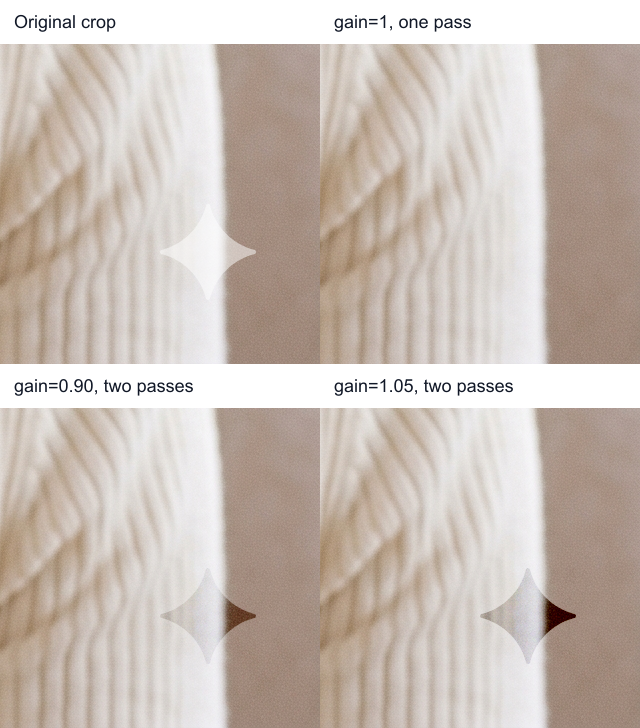
This is the practical lesson: a remover should not optimize only for a single residual score. A spatial correlation score can keep improving after the visible watermark is already gone, because the solver is still reducing a logo-shaped component in the residual. But inverse alpha is signed arithmetic. If the first pass has already removed the positive white overlay, another pass can subtract the same shape again and create a negative residual. Visually, that negative residual is the dark star.
The guardrail should be closer to how the artifact is seen. The watermark is most visible at its feathered edge, where alpha changes quickly and creates a gradient that does not belong to the background. A robust selector should ask two questions at the same time: did the logo-shaped residual shrink, and did the edge energy collapse without flipping sign? If the outline has already disappeared, a second pass should need strong evidence before it is accepted.
The diagnosis is important for users: position can be correct while strength is wrong. A tool that keeps pushing for a lower residual can turn a white watermark into a dark one.
What a Robust Pipeline Should Do
A useful deterministic pipeline usually has three stages.
1. Locate the overlay
Start with the expected position if the watermark format is standardized. Search nearby integer offsets or sub-pixel shifts only when the residual suggests misalignment. Position search is valuable, but it should not override a strong canonical match without evidence.
2. Fit the alpha strength conservatively
Try a small set of alpha gains, but prefer the lowest-strength solve that removes the visible edge. More gain is not automatically better. If a stronger gain only improves spatial correlation while increasing edge residuals, it should be rejected.
3. Stop before overcorrection
Multi-pass removal is tempting because it can continue reducing a residual score. It is also risky. Once the watermark edge has collapsed, another inverse pass can subtract signal that is no longer there. That is how a white watermark becomes a dark ghost.
Practical Checklist
Use inverse alpha restoration when the watermark is fixed, transparent, and repeatable. Use inpainting when the watermark or object fully hides content that is no longer encoded in the pixels.
- Start from the original export whenever possible. Avoid screenshots and chat-app forwards.
- Remove the watermark before resizing, compressing, filtering, sharpening, denoising, or color grading.
- Treat strong multi-pass cleanup with suspicion. If a white watermark becomes a dark mark, it is overcorrected.
- Watch the feathered edge, not only the center of the logo. Edge/gradient residuals are a better visual guardrail than spatial correlation alone.
- Check whether the source was blended and inverted in the same color-space assumptions. sRGB/linear mismatches can cause luminance drift around semi-transparent edges.
- Reserve AI inpainting for unknown content, not fixed transparent overlays that can be mathematically inverted.
Fixed transparent watermarks are often mixed pixels, not missing pixels. That makes them a fit for inverse alpha restoration: estimate the logo color, mask, and position; invert the blend; and stop before the solver creates a new artifact.
If you want the practical version rather than the engineering notes, use AuraTuner's free Gemini Watermark Remover. It also works as a Gemini logo remover for the visible lower-right mark on standard Nano Banana exports, with no sign-up required. The tool is the cleanup entry point; this article explains the inverse alpha model, source-image limits, and why conservative restoration usually beats repeated overcorrection.